

Overview
感謝您使用「台灣圖霸 學區圖」!
台灣圖霸 學區圖 主要分成兩個部分:(1) 學區圖資,與 (2) 呈現樣式。
導入非常簡單 -- 基本上,您只需要兩個步驟即可導入:
在您的
var map = gomp.Map(...)物件上,呼叫map.addSource()將學區圖資來源加入加上按鈕控制圖層顯示/開關
這樣就完成了!
恭喜,Congratulations!!! :D
學區圖資
步驟一 引入學區圖資
var map = gomp.Map(...);

...

map.once("idle", function() {
    ...
    map.addSource("school_dist", {
        type: "vector",
        url: "https://api.map8.zone/data/school-district.json"
    });
    ...
});
學區圖資之 URL 為:https://api.map8.zone/data/school-district.json
加入學區圖層
請注意 - 在此步驟中,被加入的學區圖預設為不顯示 'visibility': 'none',我們會在下一段落提到如何控制圖層顯示與否。
呈現樣式
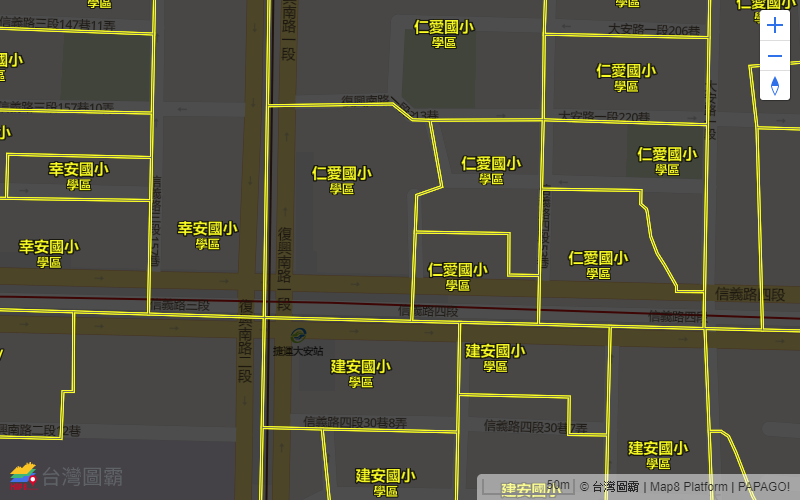
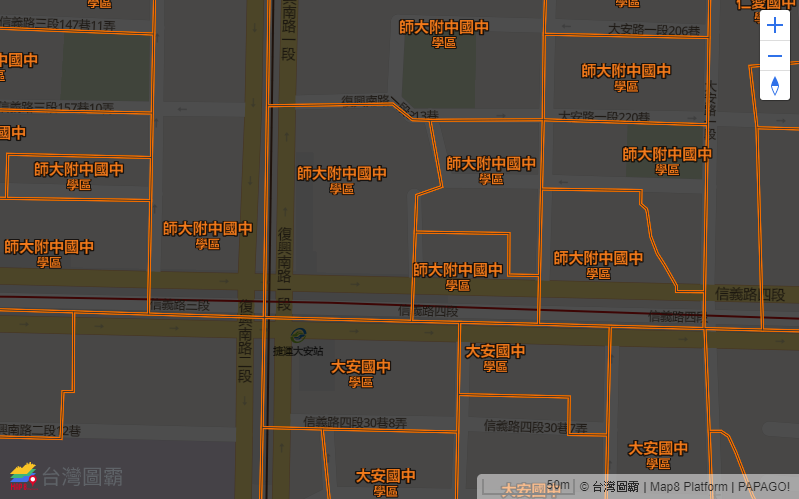
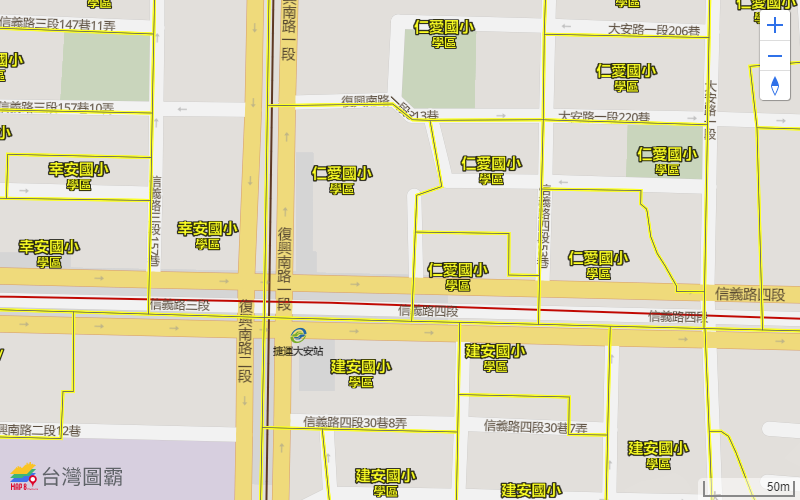
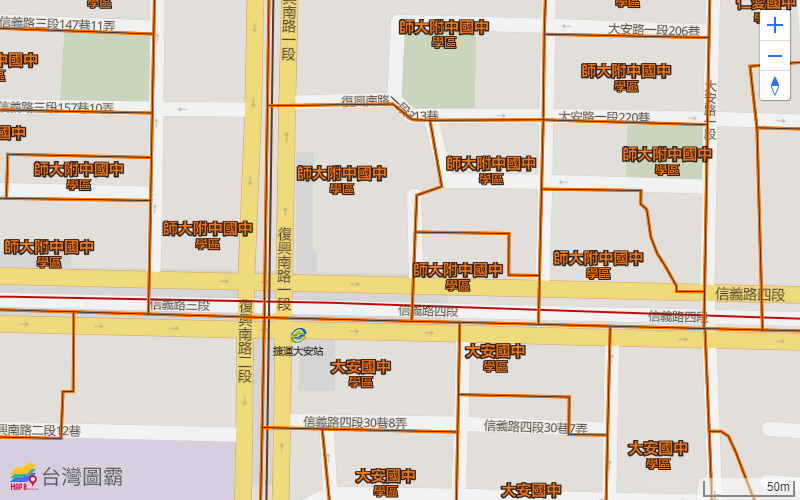
目前有兩種樣式供您選擇:風格 A 與 風格 B。您也可以基於此二版本,另外將 paint 裡各個選項修改為您想要的顏色。
風格 A
步驟二 套用
風格 A樣式,範例 code snippet 如下:
var schoolDistType = ["school_district_es", "school_district_jhs"];
map.once("idle", function() {
    map.addSource("school_dist", {
        type: "vector",
        url: "https://api.map8.zone/data/school-district.json"
    });
    schoolDistType.forEach(function(name, i) {
        map.addLayer({
            'id': name,
            'type': "fill",
            'source': "school_dist",
            'source-layer': name,
            'paint': {
                'fill-color': '#000000',
                'fill-opacity': 0.7
            },
            'layout': {
                'visibility': 'none'
            }
        });
        map.addLayer({
            'id': name + '_line_black',
            'type': "line",
            'source': "school_dist",
            'source-layer': name,
            'paint': {
                'line-color': (name == 'school_district_es') ? '#666' : '#333',
                'line-opacity': 1,
                'line-width': 0.5
            },
            'layout': {
                'line-join': 'miter',
                'visibility': 'none'
            }
        });
        map.addLayer({
            'id': name + '_line',
            'type': "line",
            'source': "school_dist",
            'source-layer': name,
            'paint': {
                'line-color': (name == 'school_district_es') ? '#ffff00' : '#ff6f00',
                'line-opacity': 1,
                'line-width': 3
            },
            'layout': {
                'line-join': 'miter',
                'visibility': 'none'
            }
        }, name + '_line_black');
        map.addLayer({
            'id': name + '_text',
            'type': "symbol",
            'source': "school_dist",
            'source-layer': name,
            'layout': {
                'text-field': [
                    'format',
                    ['get', 'schoolname'], {},
                    '\n ', {},
                    '學區', {'font-scale': .8},
                ],
                'text-font': ["Open Sans Bold"],
                'text-size': 15,
                'visibility': 'none'
            },
            'paint': {
                'text-color': (name == 'school_district_es') ? '#ffff00' : '#fc7c21',
                'text-halo-color': '#000',
                'text-halo-width': 1
            }
        });
    });
});
風格 B
步驟二 套用
風格 B樣式,範例 code snippet 如下:
var schoolDistType = ["school_district_es", "school_district_jhs"];
map.once("idle", function() {
    map.addSource("school_dist", {
        type: "vector",
        url: "https://api.map8.zone/data/school-district.json"
    });
    schoolDistType.forEach(function(name, i) {
        map.addLayer({
            'id': name,
            'type': "fill",
            'source': "school_dist",
            'source-layer': name,
            'paint': {
                'fill-color': '#000000',
                'fill-opacity': 0.7
            },
            'layout': {
                'visibility': 'none'
            }
        });
        map.addLayer({
            'id': name + '_line_black',
            'type': "line",
            'source': "school_dist",
            'source-layer': name,
            'paint': {
                'line-color': (name == 'school_district_es') ? '#666' : '#333',
                'line-opacity': 1,
                'line-width': 0.5
            },
            'layout': {
                'line-join': 'miter',
                'visibility': 'none'
            }
        });
        map.addLayer({
            'id': name + '_line',
            'type': "line",
            'source': "school_dist",
            'source-layer': name,
            'paint': {
                'line-color': (name == 'school_district_es') ? '#ffff00' : '#ff6f00',
                'line-opacity': 1,
                'line-width': 3
            },
            'layout': {
                'line-join': 'miter',
                'visibility': 'none'
            }
        }, name + '_line_black');
        map.addLayer({
            'id': name + '_text',
            'type': "symbol",
            'source': "school_dist",
            'source-layer': name,
            'layout': {
                'text-field': [
                    'format',
                    ['get', 'schoolname'], {},
                    '\n ', {},
                    '學區', {'font-scale': .8},
                ],
                'text-font': ["Open Sans Bold"],
                'text-size': 15,
                'visibility': 'none'
            },
            'paint': {
                'text-color': (name == 'school_district_es') ? '#ffff00' : '#fc7c21',
                'text-halo-color': '#000',
                'text-halo-width': 1
            }
        });
    });
透過按鈕切換/開關學區圖
步驟三 加入按鈕控制圖層的顯示/開關,範例 code snippet 如下:
<!-- HTML -->
<button type="button" onclick="toggleSchoolDistLayers('hideAll')">不顯示學區</button>
<button type="button" onclick="toggleSchoolDistLayers('school_district_es')">國小學區</button>
<button type="button" onclick="toggleSchoolDistLayers('school_district_jhs')">國中學區</button>
// JavaScript
function toggleSchoolDistLayers(target) {
    if (target == schoolDistType[0]) {
        setSchoolDistLayerVisibility(schoolDistType[0], 'visible');
        setSchoolDistLayerVisibility(schoolDistType[1], 'none');
    }
    else if (target == schoolDistType[1]) {
        setSchoolDistLayerVisibility(schoolDistType[0], 'none');
        setSchoolDistLayerVisibility(schoolDistType[1], 'visible');
    }
    else {
        setSchoolDistLayerVisibility(schoolDistType[0], 'none');
        setSchoolDistLayerVisibility(schoolDistType[1], 'none');
    }
}
function setSchoolDistLayerVisibility(schoolDistType, visibility) {
    var layerNameSuffixes = ['', '_line', '_line_black', '_text'];
    layerNameSuffixes.forEach(function(v) {
        map.setLayoutProperty(schoolDistType + v, "visibility", visibility);
    });
}
上一步驟中加入的圖層預設為不顯示,必須再加入按鈕來切換/開關學區圖。
完整範例 (以樣式 A 為例)
完整範例 code snippet (以樣式 A 為例) 如下:
<!DOCTYPE html>
<html>
<head>
    <meta charset="utf-8" />
    <link rel="stylesheet" href="https://api.map8.zone/css/gomp.css?key=[YOUR_API_KEY_HERE]" />
    <style>
        #map{
            height: 400px;
            width: 100%;
        }
    </style>
</head>
<body>
    <div id="map"></div>
    <button type="button" onclick="toggleSchoolDistLayers('hideAll')">不顯示學區</button>
    <button type="button" onclick="toggleSchoolDistLayers('school_district_es')">國小學區</button>
    <button type="button" onclick="toggleSchoolDistLayers('school_district_jhs')">國中學區</button>

    <script type="text/javascript" src="https://api.map8.zone/maps/js/gomp.js?key=[YOUR_API_KEY_HERE]"></script>
    <script type="text/javascript">
        gomp.accessToken = '[YOUR_API_KEY_HERE]';
        var map = new gomp.Map({
            container: 'map',
            style: 'https://api.map8.zone/styles/go-life-maps-tw-style-std/style.json',
            maxBounds: [[105, 15], [138.45858, 33.4]],
            center: [121.54885, 25.037853],
            zoom: 16,
            minZoom: 6,
            maxZoom: 19.99,
            attributionControl: false
        }).addControl(new gomp.AttributionControl({
            compact: false
        }));
        map.addControl(new gomp.NavigationControl());

        var schoolDistType = ["school_district_es", "school_district_jhs"];

        map.once("idle", function() {
            map.addSource("school_dist", {
                type: "vector",
                url: "https://api.map8.zone/data/school-district.json"
            });
            schoolDistType.forEach(function(name, i) {
                map.addLayer({
                    'id': name,
                    'type': "fill",
                    'source': "school_dist",
                    'source-layer': name,
                    'paint': {
                        'fill-color': '#000000',
                        'fill-opacity': 0.7
                    },
                    'layout': {
                        'visibility': 'none'
                    }
                });
                map.addLayer({
                    'id': name + '_line_black',
                    'type': "line",
                    'source': "school_dist",
                    'source-layer': name,
                    'paint': {
                        'line-color': (name == 'school_district_es') ? '#666' : '#333',
                        'line-opacity': 1,
                        'line-width': 0.5
                    },
                    'layout': {
                        'line-join': 'miter',
                        'visibility': 'none'
                    }
                });
                map.addLayer({
                    'id': name + '_line',
                    'type': "line",
                    'source': "school_dist",
                    'source-layer': name,
                    'paint': {
                        'line-color': (name == 'school_district_es') ? '#ffff00' : '#ff6f00',
                        'line-opacity': 1,
                        'line-width': 3
                    },
                    'layout': {
                        'line-join': 'miter',
                        'visibility': 'none'
                    }
                }, name + '_line_black');
                map.addLayer({
                    'id': name + '_text',
                    'type': "symbol",
                    'source': "school_dist",
                    'source-layer': name,
                    'layout': {
                        'text-field': [
                            'format',
                            ['get', 'schoolname'], {},
                            '\n ', {},
                            '學區', {'font-scale': .8},
                        ],
                        'text-font': ["Open Sans Bold"],
                        'text-size': 15,
                        'visibility': 'none'
                    },
                    'paint': {
                        'text-color': (name == 'school_district_es') ? '#ffff00' : '#fc7c21',
                        'text-halo-color': '#000',
                        'text-halo-width': 1
                    }
                });
            });
        });

        function toggleSchoolDistLayers(target) {
            if (target == schoolDistType[0]) {
                setSchoolDistLayerVisibility(schoolDistType[0], 'visible');
                setSchoolDistLayerVisibility(schoolDistType[1], 'none');
            }
            else if (target == schoolDistType[1]) {
                setSchoolDistLayerVisibility(schoolDistType[0], 'none');
                setSchoolDistLayerVisibility(schoolDistType[1], 'visible');
            }
            else {
                setSchoolDistLayerVisibility(schoolDistType[0], 'none');
                setSchoolDistLayerVisibility(schoolDistType[1], 'none');
            }
        }
        function setSchoolDistLayerVisibility(schoolDistType, visibility) {
            var layerNameSuffixes = ['', '_line', '_line_black', '_text'];
            layerNameSuffixes.forEach(function(v) {
                map.setLayoutProperty(schoolDistType + v, "visibility", visibility);
            });
        }
    </script>
</body>
</html>
此為完整 HTML 範例 (含 JavaScript 部份),複製貼上後請 記得填入您的 Map8 API Key 即可看到成果!
恭喜!Congratulations!!! :D
台灣圖霸感謝您的支持與愛護!
有任何疑問,或是指教,都非常歡迎您找我們詢問。
非常感謝!

https://map8.zone